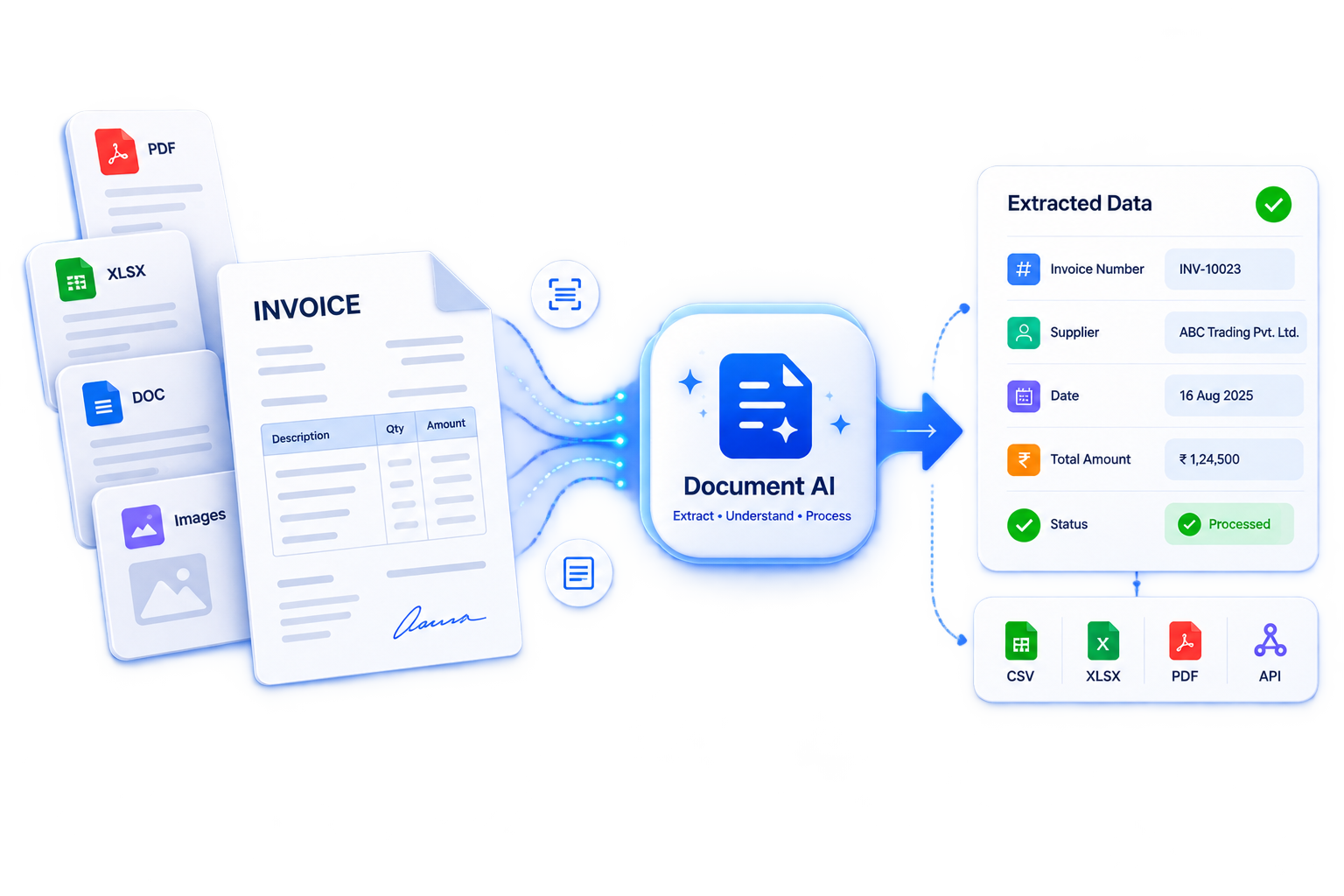
Document AI: Turning Documents Into Usable Data
Organizations rely on documents to move work forward. Invoices trigger payments, contracts define obligations, and applications support decisions. Yet much of the information inside these files remains difficult to search, compare, or transfer into business systems.
Document AI helps bridge that gap. By combining text recognition, machine learning, and language understanding, it can turn unstructured and semistructured documents into organized information that software—and people—can use.
What Is Document AI?
Document AI, often associated with intelligent document processing, refers to technologies that identify, extract, interpret, and organize information from documents. These documents may include scanned pages, PDFs, photographs, forms, spreadsheets, and digitally generated files.
A basic system might extract an invoice number and payment due date. A more advanced system could classify the invoice, capture individual line items, compare totals against a purchase order, and flag discrepancies for review.
The term describes a broad technology category. It also appears in product names, such as Google Cloud Document AI. Features, deployment options, and supported document types vary by provider.
How Document AI Works
Although implementations differ, most document-processing workflows include several stages.
Document Intake and Preparation
Files enter the system through uploads, email attachments, scanners, or software integrations. Preprocessing may rotate pages, reduce image noise, or improve contrast. These steps matter because blurry text, skewed scans, and missing pages can reduce extraction quality.
Text and Layout Recognition
Optical character recognition, or OCR, converts text in images into machine-readable characters. Layout analysis identifies elements such as headings, paragraphs, tables, checkboxes, and text positions. For digital PDFs, some systems can extract embedded text directly rather than relying entirely on OCR.
Classification and Information Extraction
Machine learning models determine the document type and locate relevant information. An invoice processor might extract the supplier name, invoice date, tax amount, and total. A contract processor might identify parties, effective dates, and renewal clauses.
Validation and Human Review
Extracted information can be checked against business rules, reference databases, or related documents. Low-confidence results and unusual values can be routed to a reviewer. Confidence scores help prioritize review, but they are not guarantees of correctness.
Integration Into Business Workflows
Validated data can flow into accounting software, customer relationship management platforms, document repositories, or other business systems. This integration turns extraction into a practical workflow rather than an isolated technical task.
Document AI vs. Traditional OCR
Traditional OCR primarily answers the question, “What text appears on this page?” Document AI goes further by asking, “What does this information represent, and how should it be organized?”
For example, OCR may recognize several dates on an invoice. Document AI attempts to distinguish the invoice date from the payment due date. It may also associate a price with the correct item in a table.
The distinction is not absolute. Many modern OCR products include layout analysis and extraction features, so evaluating specific capabilities is more useful than relying on product labels.
Common Business Applications
- Accounts payable: Extract invoice details, support purchase-order matching, and flag possible duplicate submissions.
- Insurance: Organize claims documents and identify information needed for review.
- Banking and lending: Extract data from applications, financial statements, and supporting records.
- Legal operations: Locate contract clauses, key dates, and obligations for professional review.
- Logistics: Process bills of lading, shipping documents, and delivery records.
- Healthcare administration: Structure information from administrative forms while applying appropriate privacy and security controls.
Benefits and Limitations
Document AI can reduce repetitive data entry, accelerate processing, and make document information easier to search and analyze. Standardized extraction can also improve consistency across teams.
However, performance depends on the documents and the task. Handwriting, complex tables, unfamiliar layouts, and poor image quality can cause errors. Language models used for document interpretation may generate plausible but unsupported answers, especially when source material is incomplete or ambiguous.
For high-stakes workflows, important outputs should remain traceable to the source document. Payment approvals, eligibility decisions, and legal interpretations may require additional controls and qualified human review.
Security and Privacy Considerations
Documents frequently contain personal, financial, or confidential information. Before adopting a platform, organizations should examine access controls, encryption, data retention, processing locations, and whether submitted content may be used for model training.
Systems that use language models should also treat document contents as untrusted input. Instructions embedded in a file should not be allowed to override workflow rules or trigger unauthorized actions.
How to Get Started
A focused pilot is usually more useful than a broad rollout. Select one document type, define the required fields, and test representative examples—including difficult cases. Measure field-level accuracy, review time, exception rates, and total processing cost.
The goal is not simply to extract more text. It is to create a reliable flow of information from documents into decisions and operations. Document AI delivers the most value when accurate extraction, clear validation rules, and human oversight work together.
9 Tips for Accurate, Secure, and Efficient Document AI
- Start with a clear document-processing goal.
- Use clean, high-resolution scans.
- Choose a model suited to your document types.
- Protect sensitive data and control access.
- Review extracted text for accuracy.
- Validate key fields against trusted records.
- Keep a human in the loop for critical decisions.
- Track accuracy, speed, and processing costs.
- Update workflows as documents and needs change.
Start with a clear document-processing goal.
Start with a clear document-processing goal before choosing a Document AI tool. Identify the documents to process, the information to extract, and the business outcome to improve. For example, an accounts payable team might aim to capture invoice numbers, vendor names, and totals to reduce manual data entry. Define success with measurable targets, such as field-level accuracy, processing time, and the percentage of documents requiring human review. A focused goal makes it easier to select the right technology, evaluate results, and avoid automating steps that add little value.
Use clean, high-resolution scans.
Use clean, high-resolution scans to help Document AI recognize text and extract information accurately. Aim for around 300 DPI for standard printed documents, and make sure each page is sharp, properly aligned, and fully visible. Avoid blurry images, shadows, glare, and excessive compression, which can obscure characters and table boundaries. For photographed documents, use even lighting and hold the camera parallel to the page. Clear source files can reduce extraction errors and the need for manual corrections.
Choose a model suited to your document types.
Choose a Document AI model that matches the types of documents being processed. A model designed for invoices may handle totals and line items well but struggle with contract clauses, handwritten forms, or medical records. Consider document layouts, languages, scan quality, and the specific fields that need to be extracted. Test suitable models on representative samples, including difficult cases, and compare accuracy before committing. If pretrained models do not meet the requirements, a custom model may be worth evaluating.
Protect sensitive data and control access.
Protect sensitive data and limit access when using document AI. Documents may contain personal, financial, or confidential information, so use encryption, role-based permissions, and secure storage to help prevent unauthorized access. Review who can view, download, or process files, and set clear data-retention rules. Before choosing a provider, check how it handles your data, including whether documents may be used to train its models.
Review extracted text for accuracy.
Review extracted text for accuracy before using it in a workflow or making decisions based on it. Document AI can misread blurry scans, handwriting, complex tables, or unusual fonts, so compare important details—such as names, dates, invoice totals, and account numbers—with the original document. Pay special attention to missing fields, misplaced decimal points, and easily confused characters, such as “O” and “0.” Use confidence scores to prioritize checks, but do not treat high scores as proof of accuracy. For sensitive or high-stakes information, require human verification before approving or transferring the data.
Validate key fields against trusted records.
Validate key fields extracted by Document AI against trusted records before using them in downstream workflows. For example, compare vendor names and bank details with an approved supplier database, match invoice numbers and amounts to purchase orders, and check customer IDs against existing account records. These checks can catch extraction errors, outdated information, and potentially fraudulent changes that confidence scores alone may miss. Flag mismatches for human review rather than automatically accepting or overwriting values, especially when the information affects payments, compliance, or customer decisions.
Keep a human in the loop for critical decisions.
Keep a human in the loop when using Document AI for critical decisions, such as approving payments, determining eligibility, or interpreting contract terms. Even advanced systems can misread text, miss context, or extract incorrect values, so qualified reviewers should verify consequential information against the original document before taking action. Set clear review rules that flag low-confidence results, inconsistencies, and unusual cases, but do not treat high confidence as proof of accuracy. Human oversight helps catch errors, maintain accountability, and prevent automated mistakes from affecting people or business operations.
Track accuracy, speed, and processing costs.
Track accuracy, speed, and processing costs to understand whether Document AI is delivering value. Measure how often key fields are extracted correctly, how long each document takes to process—including human review—and the total cost per document. Include software fees, infrastructure, and manual corrections rather than relying only on the advertised processing price. Compare results against your existing workflow, and break them down by document type and complexity to identify bottlenecks. Review these metrics regularly so that faster processing or lower costs do not come at the expense of accuracy.
Update workflows as documents and needs change.
Update Document AI workflows regularly as document formats, business requirements, and processing needs change. New layouts, additional fields, or revised compliance requirements can make existing extraction rules and validation steps less effective. Monitor accuracy and exception rates, gather feedback from reviewers, and test updates on representative documents before deploying them. Adjust models, business rules, and human review thresholds as needed to keep processing reliable and aligned with current goals.